What Exactly Is Reverb Pre-Delay?
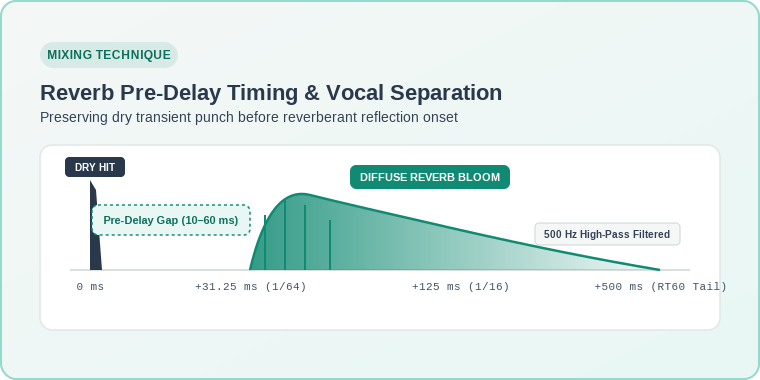
Pre-delay is the time gap (measured in milliseconds) between the arrival of the original dry audio signal and the onset of the first early reflections generated by the reverb processor. In acoustic physical spaces, this gap occurs naturally because sound travels at roughly 343 meters per second (approx. 1.13 feet per millisecond), requiring time to strike physical boundaries before bouncing back to the listener's ears.
In digital audio workstations (DAWs), setting pre-delay allows the transient and initial syllables of a source to register cleanly before being enveloped by reverberant reflections.
The Physics of Acoustic Distance & Boundary Reflection Math
In architectural acoustics, pre-delay directly informs the human brain about the physical size of the room and the singer's distance from the nearest boundary walls. Because sound waves travel through ambient air at approximately 343 meters per second (1,125 feet per second) at 20°C (68°F), every 1 millisecond corresponds to approximately 0.343 meters (1.13 feet) of sound travel.
When an acoustic reflection reaches your ears, the sound wave has made a round trip: leaving the sound source, traveling to the wall, and reflecting back to the microphone or listener. Note that this formula represents a simplified geometric model; in physical rooms, actual early reflection patterns depend on the precise positions of the sound source, listener, and surrounding architectural surfaces. You can calculate the virtual distance to the nearest reflective boundary with the formula:
Virtual Boundary Distance Formula
Distance to Wall (meters) = (Pre-Delay in ms × 0.343) ÷ 2
Where dividing by 2 accounts for the sound wave's round-trip travel path between the source, wall, and listener.
| Pre-Delay Setting (ms) | Round-Trip Travel | Distance to Nearest Boundary | Perceived Virtual Room Type |
|---|---|---|---|
| 5 ms | 1.71 m (5.6 ft) | 0.86 m (2.8 ft) | Tight Vocal Isolation Booth / Small Closet |
| 15 ms | 5.15 m (16.9 ft) | 2.57 m (8.4 ft) | Professional Studio Live Tracking Room |
| 30 ms | 10.29 m (33.8 ft) | 5.15 m (16.9 ft) | Medium Acoustic Recital Chamber |
| 50 ms | 17.15 m (56.3 ft) | 8.58 m (28.1 ft) | Orchestral Scoring Stage / Concert Hall |
| 80 ms | 27.44 m (90.0 ft) | 13.72 m (45.0 ft) | Cathedral Nave / Distant Canyon Echo |
Why Setting Pre-Delay to BPM Matters
When pre-delay is set haphazardly, early reflections can collide with successive rhythmic hits (such as the next 16th-note hi-hat or the next syllable in a vocal verse). Synchronizing pre-delay to musical note values guarantees that the reverb plume blooms on the offbeat or rhythmically supportive subdivisions.
The Golden Formula
To calculate a 64th-note pre-delay at any tempo: Pre-Delay (ms) = 60,000 ÷ BPM ÷ 16. For a 32nd-note pre-delay: 60,000 ÷ BPM ÷ 8.
Interactive Pre-Delay Quick Calculator
Enter your session BPM below to immediately preview exact millisecond values for standard pre-delay subdivisions:
Interactive Pre-Delay Calculator
Adjust tempo to see note values update in real time:
Common Musical Subdivisions for Pre-Delay
Depending on the genre, tempo, and arrangement density, the practical pre-delay range typically falls between roughly 10 ms and 60 ms for most sources:
| Subdivision | Formula | @ 120 BPM | Best For |
|---|---|---|---|
| 1/128 Note | (60,000 / BPM) / 32 | 15.63 ms | Tight snare snap, rap vocals, subtle dimensional sheen |
| 1/64 Note | (60,000 / BPM) / 16 | 31.25 ms | Lead pop vocals, acoustic guitars, intimate placement |
| 1/32 Note | (60,000 / BPM) / 8 | 62.50 ms | Ballad vocals, lush cinematic textures, cavernous spaces |
| 1/16 Note | (60,000 / BPM) / 4 | 125.00 ms | Special slapback-reverb hybrid effects |
Step-by-Step: Dialing Lead Vocal Pre-Delay
- Identify Session BPM: Check your DAW project tempo (e.g., 128 BPM).
- Calculate 1/64 or 1/128 Note: At 128 BPM, a 1/64 note is
60,000 ÷ 128 ÷ 16 = 29.30 ms. A 1/128 note is14.65 ms. - Set Pre-Delay on Aux Send: Enter
29.3 msinto your reverb plugin's pre-delay field. - A/B in Mix Context: Listen to the lead vocal with the full mix playing. Notice how the singer's consonants ('T', 'K', 'S') cut through front-and-center, while the reverb decay gracefully sustains in the background without smearing.
The Psychoacoustics of Pre-Delay & The Haas Effect
To master pre-delay, it helps to understand the psychoacoustic boundary known as the Haas Effect (Precedence Effect):
When two identical or near-identical sound events arrive at the human ear separated by less than roughly 30 to 50 milliseconds, the brain fuses them into a single auditory event. The listener does not hear two distinct sounds; instead, the brain attributes the location of the sound entirely to the direction of the first arriving transient, while the second sound adds perceived fullness, width, and volume.
With discrete echoes, delays beyond roughly 30 to 50 ms begin separating into two distinct localized events. However, reverberation is fundamentally different from a discrete echo: it consists of hundreds of dense, diffuse reflections scattered across room surfaces. Because reverb is diffuse rather than a single repeat, setting pre-delay within roughly 10 to 60 ms for most sources keeps the spatial field feeling organic and natural, while carving out a clean space for the dry transient before the reverberant plume blooms.
Pre-Delay Guidelines Across Different Instruments
Different musical instruments have radically different acoustic envelopes. Applying the same blanket pre-delay across your entire mix will cause rhythmic confusion. Follow these instrument-specific targets:
| Instrument | Target Pre-Delay | Musical Note Equiv. | Acoustic Objective |
|---|---|---|---|
| Lead Pop Vocal | 20–40 ms | 1/64 note | Protects vocal presence and consonant articulation. |
| Snare Drum (Crack) | 10–20 ms | 1/128 note | Lets the initial stick impact crack through before plate bloom. |
| Acoustic Guitar | 20–35 ms | 1/64 note triplet / straight | Preserves pick attack and finger squeaks while adding body. |
| Horn Section / Brass | 30–50 ms | 1/64 note dotted | Simulates depth in an orchestral scoring stage or concert hall. |
| Background Harmonies | 0–10 ms | Near-zero | Immediately pushes backing vocalists into the background behind the lead. |
Ear Training: Diagnosing Pre-Delay (Too Short vs Too Long)
Tuning pre-delay by ear requires listening for specific acoustic artifacts. Use this diagnostic matrix during solo and full-mix auditioning:
Signs Pre-Delay is Too Short (< 10 ms on Leads)
- Lost Intimacy: The vocalist sounds as if they stepped 5 feet backward into the room immediately when the vocal starts.
- Smudged Consonants: Syllable plosives ('P', 'B') and fricatives ('S', 'T') sound filtered, dull, or muffled.
- Comb-Filtering Hollow Tone: Reflections arriving within 1–5 ms cause severe acoustic phase cancellation, hollowing out vocal warmth in the 500–1,500 Hz region.
Signs Pre-Delay is Too Long (> 60 ms on Busy Tracks)
- Audible Drum Flam / Slapback: The snare sounds like it is being struck twice in rapid succession (a distracting double-strike flam).
- Groove Disconnect: The reverberant wash arrives so late that it detached completely from the dry instrument, feeling like an unrelated background noise.
- Rhythmic Masking: The delayed reverb bloom lands directly on top of the next 16th-note transient, muddying fast vocal rap verses or synth arps.
Top 4 Pre-Delay Mistakes That Ruin Mixes
- Mistake 1: Leaving Pre-Delay at 0 ms on Leads: When pre-delay is zero, early reflections start immediately, pushing lead vocals and solo instruments backward in the depth plane and robbing them of intimacy.
- Mistake 2: Setting Pre-Delay Unaligned or Excessively Long: The ideal pre-delay range depends on genre, tempo, and source (roughly 10–60 ms for most sources). When pre-delay extends too far without intentional tempo alignment, early reflections detach from the groove and create an audible flam or double-hit effect.
- Mistake 3: Forgetting to High-Pass the Reverb Aux: Always engage a 500 Hz high-pass filter on your reverb return or send EQ. Reverberating frequencies below 500 Hz clutters the low-mid range, masking kick and bass fundamentals.
- Mistake 4: Guessing Values by Ear Without Math: Relying on arbitrary knob positions frequently lands on clashing polyrhythms. Calculating the exact 1/64 or 1/128 division locks your reverb in rhythmic symbiosis with your drummer and bassist.
Configuring Pre-Delay in Popular Reverb Plugins
Here is how to set up pre-delay across standard industry plugins:
- FabFilter Pro-R 2: Use the Pre-Delay control to set either exact milliseconds or tempo-synced note divisions. Switch the display to milliseconds if entering fractional note calculations manually.
- Valhalla VintageVerb: Adjust the PreDelay control directly to type or dial in your calculated millisecond value.
- Logic Pro ChromaVerb / Space Designer: In ChromaVerb, adjust the Pre-Delay slider on the main display, switching sync mode to manual milliseconds if dialing fractional subdivisions.
- Pro Tools D-Verb: Adjust the Pre-Delay parameter to your calculated millisecond target to offset early reflections cleanly from the transient.
Calculate Exact Pre-Delay for Your DAW
Input your session tempo into our dedicated calculator to generate instant millisecond values for 1/128, 1/64, 1/32, dotted, and triplet pre-delays.
Open BPM Reverb Calculator →Frequently Asked Questions
What is the ideal reverb pre-delay for lead vocals?
For lead vocals, a pre-delay of roughly 20 to 40 ms (often corresponding to a 1/64 note at typical tempos) lets the singer's initial consonants cut through before the reverb reflections bloom.
How does tempo affect reverb pre-delay calculations?
Synchronizing pre-delay to tempo subdivisions (such as 1/128, 1/64, or 1/32 notes) ensures early reflections arrive on a musically supportive rhythmic division, preventing groove clash.
Can pre-delay make a mix muddy if set incorrectly?
If pre-delay is set to 0 ms, reflections envelop transients immediately, pushing the source backward. Conversely, excessive unaligned pre-delay can sound like a detached double-hit. Pairing tempo-calculated pre-delay with a 500 Hz high-pass filter eliminates low-mid buildup.
Should I use milliseconds or note subdivisions for pre-delay?
Both work together. You calculate the note subdivision (such as a 1/64 note = 60,000 / BPM / 16) into milliseconds, and enter that exact millisecond value into your reverb plugin.