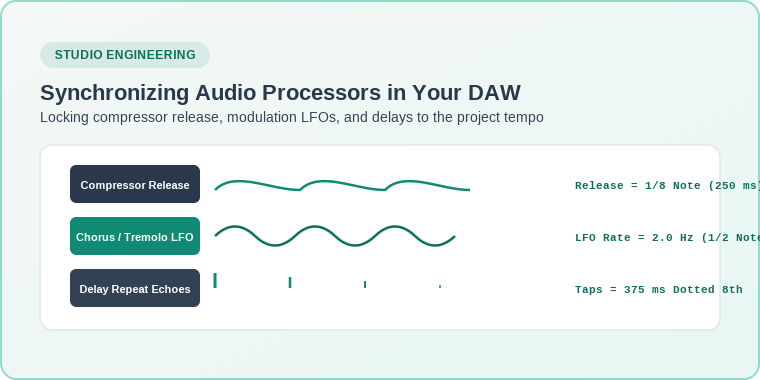
Answer First: The Master Audio Conversion Equations
1. Beat duration in milliseconds (Time Base):
Quarter Note (ms) = 60,000 ÷ BPM
2. Converting Milliseconds to LFO Frequency in Hertz (Hz):
Frequency (Hz) = 1,000 ÷ Period (ms) = BPM ÷ 60
3. Converting Hertz to Milliseconds:
Period (ms) = 1,000 ÷ Frequency (Hz)
Why Manual Tempo-Syncing Matters in Modern Production
While many contemporary digital plugins feature automated host-sync toggles (such as 1/4, 1/8D, or 1/16T), many vintage delay and tape units have no tempo sync, so their delay times are set manually in milliseconds. Analog delay pedals, classic rackmount processors, modular synthesizer LFOs, and vintage compressor emulations often require manual millisecond or Hertz calibration. Mastering the mathematics of tempo-syncing gives you full creative command over your mix dynamics.
1. Syncing Compressor Attack and Release Times
A compressor whose release time recovers arbitrarily fights against the rhythm of the track. Setting compressor release to match an 8th, 16th, or quarter-note subdivision ensures the gain reduction meter recovers in rhythm with the groove:
The Compressor Release Formula: In musical mixing, the ideal release time allows the compressor to reach full gain reduction during the transient attack and recover completely right before the next downbeat:
Synchronized Release Time (ms) = Target Subdivision (ms) − Attack Time (ms)
Worked Example at 128 BPM: An eighth note is 234.4 ms. With a punchy drum bus attack time of 30.0 ms to preserve the initial snare snap, the musically synced release time is: 234.4 − 30.0 = 204.4 ms.
- Drum Bus Compressor: Set release to an 1/8th note (e.g.,
250 ms at 120 BPM). This allows gain reduction to reset cleanly right before the next snare or kick hit strikes, creating the desirable "breathing" or "pumping" effect. - Bass Sidechain Ducking: Set release to a 1/16th note (e.g.,
125 ms at 120 BPM). The bass drops in volume to let the kick transient through, then returns to full amplitude before the next harmonic note. - Master Bus Glue Compression: Set release to an auto-recovery setting or tune it to a 1/4 note (e.g.,
500 ms at 120 BPM) with a gentle 30 ms attack to preserve mix punch. - Low-Frequency Distortion Prevention: When compressing bass instruments, never set release times shorter than the wave cycle of the lowest note. A 40 Hz sub-bass wave takes
25 msper single cycle (1,000 ÷ 40). Setting release to under 25 ms will cause the compressor to track individual wave peaks, creating harsh intermodulation distortion.
2. Syncing Modulation LFOs (Hertz vs BPM)
Time-domain processors like delays measure intervals in milliseconds ($T$), but Low-Frequency Oscillators (LFOs) in analog synthesizers, phasers, and flangers measure cyclic speed in Hertz (Hz), representing cycles per second ($f = 1/T$). To calculate the exact Hertz rate required to lock an LFO to your track's tempo, use the direct derivation:
- Quarter-Note Rate (1 pulse per beat):
Hz = BPM ÷ 60 - Half-Note Rate (1 pulse every 2 beats):
Hz = BPM ÷ 120 - Whole Note / 1-Bar Cycle (4 beats in 4/4):
Hz = BPM ÷ 240 - Two-Bar Sweep (8 beats):
Hz = BPM ÷ 480 - Eighth-Note Rate (2 pulses per beat):
Hz = BPM ÷ 30 - Sixteenth-Note Rate (4 pulses per beat):
Hz = BPM ÷ 15
3. Master BPM to Hertz Modulation Calibration Table
The table below provides instantly usable Hertz calibrations across standard tempos from 70 to 160 BPM:
| Tempo (BPM) | 2-Bar Sweep (Hz) | 1-Bar Cycle (Hz) | Half Note (Hz) | Quarter Note (Hz) | 8th Note (Hz) | 16th Note (Hz) |
|---|---|---|---|---|---|---|
| 70 BPM | 0.15 Hz | 0.29 Hz | 0.58 Hz | 1.17 Hz | 2.33 Hz | 4.67 Hz |
| 80 BPM | 0.17 Hz | 0.33 Hz | 0.67 Hz | 1.33 Hz | 2.67 Hz | 5.33 Hz |
| 90 BPM | 0.19 Hz | 0.38 Hz | 0.75 Hz | 1.50 Hz | 3.00 Hz | 6.00 Hz |
| 100 BPM | 0.21 Hz | 0.42 Hz | 0.83 Hz | 1.67 Hz | 3.33 Hz | 6.67 Hz |
| 110 BPM | 0.23 Hz | 0.46 Hz | 0.92 Hz | 1.83 Hz | 3.67 Hz | 7.33 Hz |
| 120 BPM | 0.25 Hz | 0.50 Hz | 1.00 Hz | 2.00 Hz | 4.00 Hz | 8.00 Hz |
| 128 BPM | 0.27 Hz | 0.53 Hz | 1.07 Hz | 2.13 Hz | 4.27 Hz | 8.53 Hz |
| 140 BPM | 0.29 Hz | 0.58 Hz | 1.17 Hz | 2.33 Hz | 4.67 Hz | 9.33 Hz |
| 160 BPM | 0.33 Hz | 0.67 Hz | 1.33 Hz | 2.67 Hz | 5.33 Hz | 10.67 Hz |
4. Calibrating Specific Modulation Effects: Tremolo, Chorus, Flanger & Phaser
Different modulation effects utilize LFOs in unique acoustic topologies:
- Tremolo (Amplitude Modulation): Locks best at rhythmic subdivisions (1/4-note or 1/8-note rates). In indie rock and vintage soul, setting tremolo to an exact 1/8th note creates a rhythmic pulse that locks directly to the rhythm guitar strumming pattern.
- Chorus (Pitch Modulation): Employs delay times between 15–35 ms modulated by a slow LFO (typically half-note or quarter-note rates: 0.8 to 2.0 Hz). Keeping chorus LFOs locked to half-notes prevents pitch wobble from clashing with lead vocal intonation.
- Flanger (Short Delay Comb-Filtering): Relies on micro-delays between 0.5–10 ms with feedback. Locking the flanger LFO to a long 1-bar or 2-bar cycle (0.25 to 0.50 Hz at 120 BPM) produces a sweeping jet-plane woosh that peaks exactly on downbeat transitions.
- Phaser (All-Pass Phase Shifting): Sweeps non-linear notch filters across the spectrum. A 1-bar or half-note LFO rate prevents phase cancellations from thinning out drum overheads or Rhodes electric pianos.
5. Syncing Time-Based Processors (Reverb & Delay)
For delay repeats and reverb pre-delays, precision millisecond alignment prevents phase cancellation and acoustic clutter:
- Reverb Pre-Delay: Separate your dry vocal transient from the reverb wash using a 1/64th or 1/128th note pre-delay duration calculated with our Pre-Delay Calculator.
- Reverb Decay (RT60): Match the total decay time to a 1-bar or 2-bar cycle via our Decay Calculator so that the reverb space clears naturally before the next section begins.
- Stereo Delays: Set the left channel to a straight 1/8 note and the right channel to a dotted 1/8 note using our BPM Delay Calculator for dimensional stereo width without center-channel frequency masking.
Step-by-Step Calibration in Popular DAWs
Follow these quick setup workflows for routing and calibrating non-synced hardware and plugins in your digital audio workstation:
- Ableton Live: Insert an External Audio Effect device on a return track. Enter your hardware delay's return latency and calibrate the delay millisecond dials using our exact calculated tempo values.
- Logic Pro: When using the vintage Tape Delay or Space Designer, switch the display from beat subdivisions to milliseconds (ms) for fine micro-timing tweaks (such as dragging the delay by -5 ms to create a rushed groove or +8 ms for a laid-back pocket).
- Pro Tools: On auxiliary send channels, insert your EQ before the time processor (high-pass filter at 500 Hz) and manually key in millisecond values into Avid Mod Delay or hardware I/O inserts.
- FL Studio: Use Fruity Delay 3 with tempo sync turned off to enter exact millisecond timings for precise polyrhythmic echoes that do not quantize to 4/4 grid locks.
Convert Any BPM to Milliseconds Instantly
Generate exact straight, dotted, and triplet millisecond times and LFO Hertz values for any session tempo with our free converter.
Open BPM to Milliseconds Calculator →Frequently Asked Questions
How do I convert Hertz (Hz) to BPM?
To convert an LFO frequency in Hertz to quarter-note BPM, multiply the frequency in Hz by 60: BPM = Frequency (Hz) × 60. For example, a 2.0 Hz LFO corresponds to 120 BPM.
Why should I calculate delay in milliseconds instead of using host sync?
Host sync locks effects rigidly to the grid. Dialing in milliseconds allows you to intentionally nudge repeats ahead (by 3–8 ms for an urgent forward drive) or behind (by 5–12 ms for a relaxed, humanized feel) while maintaining rhythmic cohesion.
How do I calculate triplet note values in milliseconds?
A triplet note subdivision is calculated by dividing two regular note values by three. For a quarter-note triplet, calculate: (Quarter Note ms × 2) ÷ 3 = (60,000 ÷ BPM × 2) ÷ 3. At 120 BPM, this equals 333.33 ms.
What is the difference between dotted notes and regular notes?
A dotted note extends the standard note duration by 50% (multiplying the value by 1.5). At 120 BPM, a regular 8th note is 250 ms, while a dotted 8th note is 250 × 1.5 = 375 ms.